Start here
Editing and styles
Media and content
Tutorials
Site and publishing
Layout and navigation
Forms and services
Table Booking places your restaurant’s reservation service on the page. Manage the restaurant, opening hours, capacity and booking rules with the provider, then configure its widget in Sitely.
The inspector offers OpenTable, The Fork and a legacy Quandoo entry. Quandoo has closed its reservation platform, so use an active provider for new bookings and review any existing Quandoo widgets. See the official service update.
Add Table Booking from Insert or Add Element. Select the provider and enter the Restaurant ID supplied by its restaurant dashboard. Use your own restaurant’s identifier; the number in an example screenshot is not a setup value.
For OpenTable, choose the offered widget layout and language. The layouts include Standard, Tall, Wide and Button, each with its own space requirements. The Fork also offers a language choice. Use the provider’s account or support tools to confirm the correct restaurant ID.
Size and position the element for the selected widget, then review every device layout. Provider content can have its own dimensions and scrolling behavior; allow enough room for the complete booking interface.
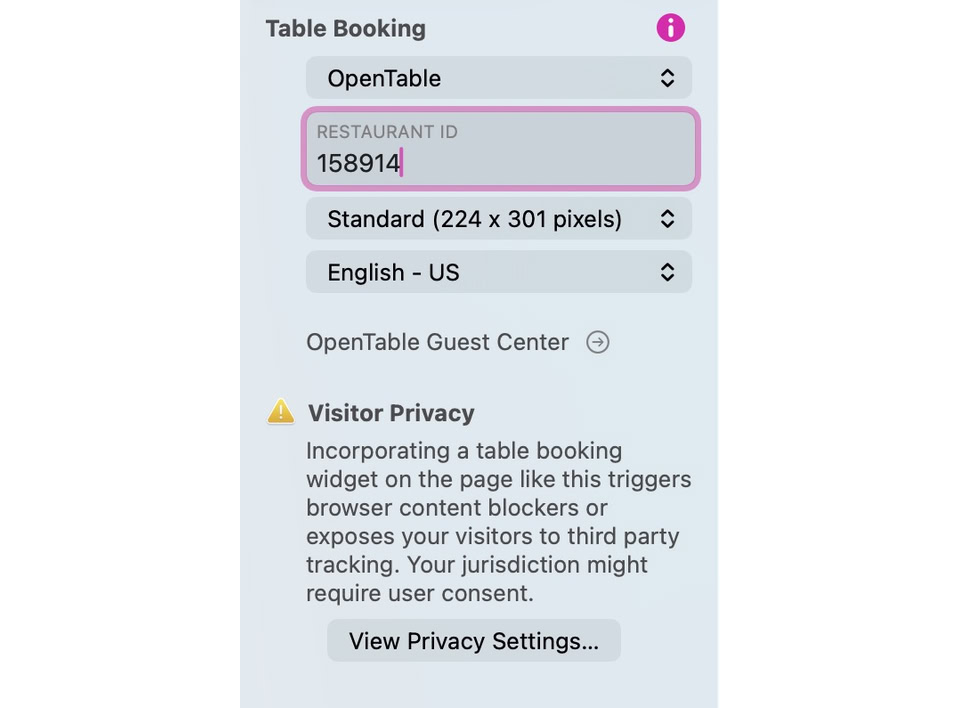
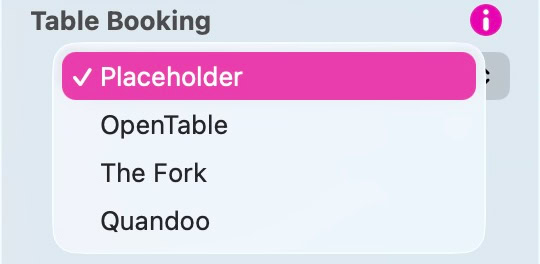
The provider menu and OpenTable settings. Quandoo remains visible as a legacy entry; check service availability before choosing a provider.
Review Site Settings > Privacy and any provider-activation controls. Test the page before and after consent, with the browser and content-blocking settings relevant to your visitors.
Check restaurant identity, dates, party size, language, mobile scrolling and the next step in the booking flow. Availability and confirmation are supplied by the reservation service; adding a widget does not create a provider account or configure the restaurant.
Keep a normal booking-page link or contact method available if the embedded service cannot load. If a provider changes its widget requirements, check its current instructions and use a supported alternative or an Embed element where appropriate.
Please report any shortcoming in this documentation and we’ll fix it as soon as possible!
Updated for Sitely 8

Powerful and refreshingly simple, at home on Mac, finding new freedom on iPad.
This website makes use of cookies.
Please see our privacy policy for details.