Erste Schritte
Medien und Inhalte
Tutorials
Website und Veröffentlichung
Layout und Navigation
Formulare und Dienste
Anleitungen
Erstellen und gestalten Sie ein Dropdown-Menü, importieren Sie Auswahlmöglichkeiten und legen Sie eine Aktion für eine Auswahl fest.
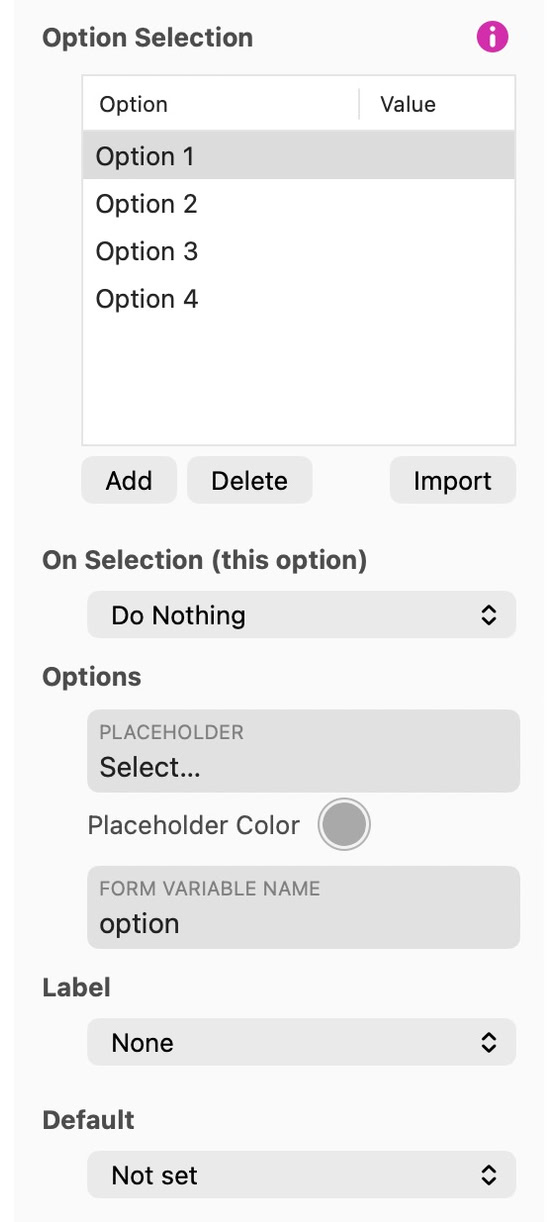
Add choices with Add in the Options list and edit each label. Placeholder sets the text shown until a visitor chooses (Select… by default) and Placeholder Color its color; Form Variable Name names the submitted value, Default picks the option selected at first (or Not set), and Validation > Required makes a choice mandatory. Look sets the Focus ring, the background and the Inner Margin. Set an optional Value for the submitted result or a calculation. When no value is specified, the label supplies the result. Use Import to load a plain-text list, such as the countries in the example below. Import reads plain text or CSV/TSV with one option per line; a second column, after a comma or tab, becomes the Value. It stops at 250 options and, after you confirm, replaces the current list and clears per-option actions.
Use Image to choose the dropdown indicator, including a Custom image. Set Options Menu to Custom to style its background, text, border, corner radius and shadow. You can also set row padding and maximum height, plus separate colors for the highlighted and selected options.
Country
Wenn Sie das selbst ausprobieren möchten, hier ein Download-Link für eine Textdatei mit Ländernamen.
On Selection (this option) is similar to the On Click option of buttons and other links: you can pick an action to perform when the specific option is selected, making the option selection element behave like a menu, or disclosing a layout block or popup containing additional form fields. The action applies to the rows selected in the Options list, so select a row first.
Verwenden Sie Save Preset im Style-Inspektor, um dieses Erscheinungsbild auf einem anderen Steuerelement desselben Typs wiederzuverwenden.
Siehe Formulare zum Konfigurieren von Einreichung und Lieferung.
Bitte Bericht alle Mängel in dieser Dokumentation und wir werden es so schnell wie möglich beheben!
Aktualisiert für Sitely 8

Leistungsstark und erfrischend einfach, zu Hause auf dem Mac, neue Freiheit auf dem iPad zu finden.
Always on. Keeps the site working.
Enables optional features.
Remembers your settings.
Counts visits and page views.
Tailors ads to your browsing.
We and our partners use optional cookies for extra features, saved preferences, visit counts and personalised ads. To change your choices later, use Cookie settings in the footer.
Closing keeps optional cookies off. Privacy policy