Erste Schritte
Medien und Inhalte
Tutorials
Website und Veröffentlichung
Layout und Navigation
Formulare und Dienste
Anleitungen
Eine Filmische Galerie beginnt als kleines Fotocover auf der Seite. Wenn ein Besucher sie öffnet, werden die Fotos zu einer animierten Präsentation im Browserfenster oder im Vollbild.
Fügen Sie eine Filmische Galerie hinzu und legen Sie Quelle zu Bildern fest. Fügen Sie die Fotos in der Bildsammlung hinzu und ordnen Sie sie neu an. Geben Sie jedem Foto eine Bildbeschreibung. Korrigieren Sie ein ausgewähltes Foto, um das Framing zu ändern, ohne die Originaldatei zu ändern. Das Cover und der geöffnete Betrachter verwenden die gleichen Fotos.
Wählen Sie im Cover Stack, Fan oder Ribbon. Visible Photos legt fest, wie viele Fotos das Cover zeigt, von zwei bis fünf. Verwenden Sie Spread, Photo Border, Photo Rounding und Shadow, um sie zu stylen.
Stack bietet auch Ordnung und Anordnung. Versuchen Sie Shuffle-Anordnung, oder behalten Sie die Anordnungsnummer, um ein Aussehen zu reproduzieren. Legen Sie einen Stapelwinkel für ein einzelnes Foto fest oder wählen Sie Automatischen Winkel, um den berechneten Winkel wiederherzustellen.
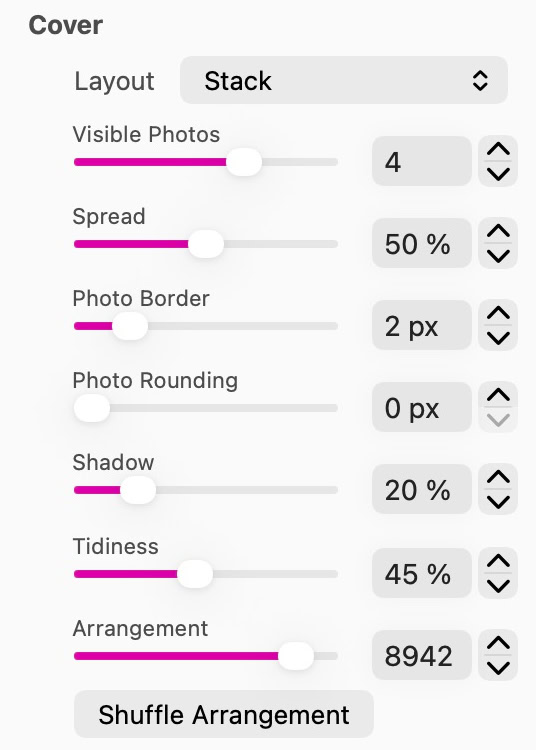
Cover-Steuerelemente legen das Layout, sichtbare Fotos, den Abstand und das Erscheinungsbild des Drucks fest.
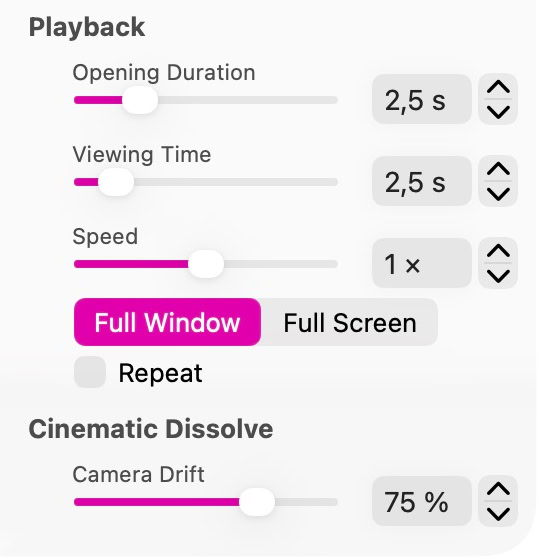
Die Wiedergabesteuerelemente legen Timing, Geschwindigkeit, Anzeigemodus und Wiederholung fest.
Choose an Effect for the opened viewer: Floating Archive, Photos on a Table, Exploded Mosaic, Orbital Exhibition, Cascading Deck, Cinematic Dissolve, Photo Constellation, Turning Pages, Chromatic Drift or Luminous Glass. Floating Archive and Photo Constellation offer Depth and Depth Blur, and Photo Constellation also Direction and Flow Speed. Photos on a Table and Cinematic Dissolve have Camera Drift, Exploded Mosaic has Tile Separation and Cascading Deck has Paper Flutter. Orbital Exhibition adds Orbit Radius and Camera Rise. Turning Pages adds Page Curl, Page Turn, View from Below, Orbit Size, Orbit Duration and Framing (Automatic, Book Spread or Single Photo). Chromatic Drift has Slide Duration, Ambience Strength, Background Brightness and Color Movement. Luminous Glass has Light Transition, Transmitted Light, Projection Softness, Highlight Glow, Camera Orbit, Orbit Duration, Camera Height and Floor Color. Select the effect first to see the controls for it.
In Playback, use Opening Duration for the transition into the viewer, Viewing Time for how long each photo is held, and Speed to adjust playback. Turn on Repeat to play the collection again.
Full Window keeps the viewer inside the browser window. Full Screen requests fullscreen when the visitor opens the gallery. Test the entire sequence when the collection mixes landscape and portrait photos.
Open the page in Preview, click the cover and move through the collection. Close the viewer with its controls or Escape; the arrow keys step through the photos and Space plays or pauses. With reduced motion, the viewer shows a still presentation without the animated cover and camera moves. Check that the cover remains easy to identify and open at each published width.
Open the photo stack to see the slideshow. Use the viewer controls to browse the photos or close the presentation.
Related: Bildergalerien
Bitte Bericht alle Mängel in dieser Dokumentation und wir werden es so schnell wie möglich beheben!
Aktualisiert für Sitely 8

Leistungsstark und erfrischend einfach, zu Hause auf dem Mac, neue Freiheit auf dem iPad zu finden.
Always on. Keeps the site working.
Enables optional features.
Remembers your settings.
Counts visits and page views.
Tailors ads to your browsing.
We and our partners use optional cookies for extra features, saved preferences, visit counts and personalised ads. To change your choices later, use Cookie settings in the footer.
Closing keeps optional cookies off. Privacy policy