Erste Schritte
Medien und Inhalte
Tutorials
Website und Veröffentlichung
Layout und Navigation
Formulare und Dienste
Anleitungen
Lassen Sie die Besucher unabhängige Optionen ein- oder ausschalten und die beiden Kontrollkästchenoptionen gestalten.
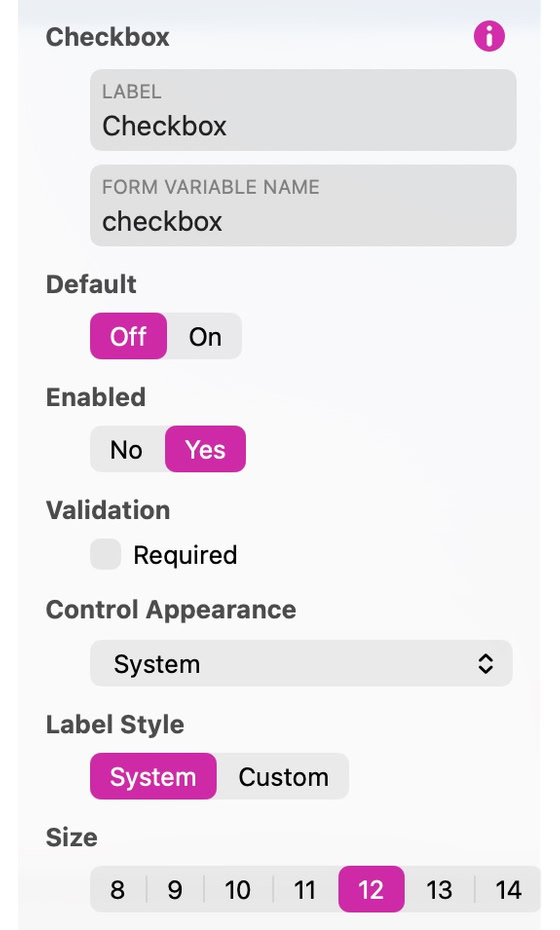
Use a checkbox for a choice a visitor can switch on or off. Several checkboxes can be selected together. Set its initial value with Default (Off or On), whether it is Enabled, and whether checking it is required.
In Control Appearance, choose System, Custom or Images. Custom supplies Off and On fill and border colors, a symbol color, size and label gap, plus Border Width and Corner Radius. Label Style chooses System, with a size from 8 to 14, or Custom, with a text style and font. Images lets you provide separate Off Image and On Image artwork. Preview both values and the focus feedback.
Verwenden Sie Save Preset im Style-Inspektor, um dieses Erscheinungsbild auf einem anderen Steuerelement desselben Typs wiederzuverwenden.
Siehe Formulare zum Konfigurieren von Einreichung und Lieferung.
Bitte Bericht alle Mängel in dieser Dokumentation und wir werden es so schnell wie möglich beheben!
Aktualisiert für Sitely 8

Leistungsstark und erfrischend einfach, zu Hause auf dem Mac, neue Freiheit auf dem iPad zu finden.
Always on. Keeps the site working.
Enables optional features.
Remembers your settings.
Counts visits and page views.
Tailors ads to your browsing.
We and our partners use optional cookies for extra features, saved preferences, visit counts and personalised ads. To change your choices later, use Cookie settings in the footer.
Closing keeps optional cookies off. Privacy policy