Erste Schritte
Medien und Inhalte
Tutorials
Website und Veröffentlichung
Layout und Navigation
Formulare und Dienste
Anleitungen
Fügen Sie einen Dateiauswahlbereich zu einem Formular hinzu und sammeln Sie die ausgewählte Anhangdatei ein.
Dies ist ein einfaches Datei-Upload-Element, mit dem Nutzer auf ihrem Computer nach einer Datei suchen und sie dem Formular anhängen können.
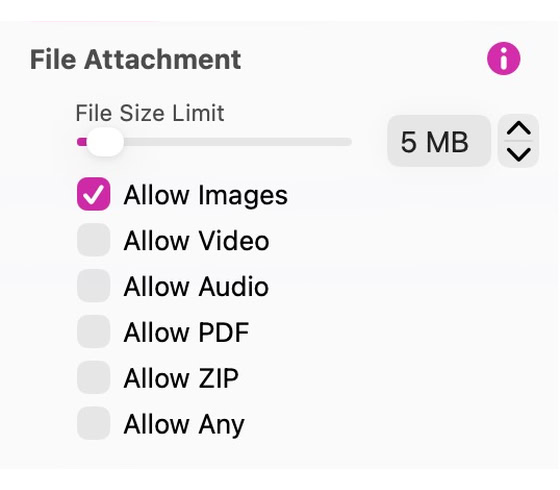
The element itself is a group of two elements, the file field and the button. These can be selected and styled individually. When the group is selected, you have full control over what users can upload with the form results. You can specify the type of files allowed, as well as the file size limit. Set File Size Limit (1 to 100 MB) and choose Allow Images, Allow Video, Allow Audio, Allow PDF, Allow ZIP or Allow Any. The file arrives as an attachment to the contact form email. Your host’s PHP upload limit can be lower than File Size Limit; a larger file then arrives as a note saying it is bigger than the server configuration limit, instead of the attachment.
Wählen Sie das Dateifeld oder die Schaltfläche Auswählen ... innerhalb der Gruppe. Verwenden Sie in Style eine kompatible Textinputfeld-Voreinstellung für das Feld oder eine Tastenvorgabe für die Schaltfläche. Wählen Sie zum Speichern eines neuen Erscheinungsbilds den gestylten Teil aus und verwenden Sie Save Preset. Die Gruppe behält ihre Dateitypen, Größenbegrenzung und Datei-Picker-Aktion bei.
Siehe Formulare zum Konfigurieren von Einreichung und Lieferung.
Bitte Bericht alle Mängel in dieser Dokumentation und wir werden es so schnell wie möglich beheben!
Aktualisiert für Sitely 8

Leistungsstark und erfrischend einfach, zu Hause auf dem Mac, neue Freiheit auf dem iPad zu finden.
Always on. Keeps the site working.
Enables optional features.
Remembers your settings.
Counts visits and page views.
Tailors ads to your browsing.
We and our partners use optional cookies for extra features, saved preferences, visit counts and personalised ads. To change your choices later, use Cookie settings in the footer.
Closing keeps optional cookies off. Privacy policy